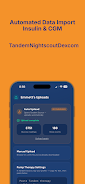
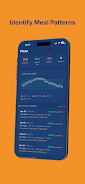
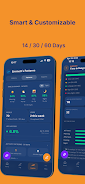
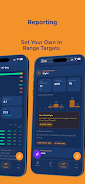
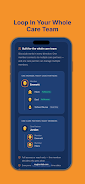
GlucoLab is a smart glucose management app that centralizes blood sugar logging, trends and medication reminders for people managing diabetes. It combines charting, CSV export and customizable alerts to help users spot patterns quickly and share clear reports with clinicians, improving daily decision-making and long-term tracking.
GlucoLab focuses on turning raw glucose readings into useful context. Instead of scrolling through long lists, the app delivers daily summaries, trend indicators and risk flags that highlight hypo- or hyperglycemia patterns. It accepts manual entries as well as imports from Bluetooth meters and formatted CSV files, so users can consolidate measurements from multiple devices into a single timeline.
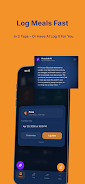
Entering readings is straightforward: choose the measurement type, add context (fasting, pre-meal, post-meal) and save. GlucoLab timestamps each entry automatically and applies smoothing to reveal underlying trends. Users can filter results by day, week or month, and overlay insulin or carb data to see cause-and-effect relationships. The app also surfaces outlier detection so unusual values don’t get lost in routine logs.
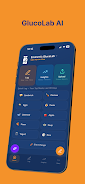
Design emphasizes clarity. Charts use high-contrast colors and simple icons to make data interpretation quick, even on smaller screens. Navigation keeps primary actions within thumb reach: add reading, view trends, and export are accessible from the bottom bar. Performance is optimized for offline use so logging remains instant when Wi‑Fi is unavailable, then syncs when connectivity returns.
GlucoLab offers several personalization options. Users can configure reminder schedules, choose between mmol/L and mg/dL, and select which metrics appear on the dashboard. For those who track nutrition or activity, the app supports custom tags and templates for repeated entries. This flexibility helps users create a routine that matches their clinical goals and daily life.
Keeping health information secure is a priority. Data stored locally can be exported or deleted at any time. When cloud sync is enabled, encrypted transfer safeguards the connection and users control whether shared reports include identifying information. These controls allow patients to provide clinicians with helpful context without exposing unnecessary details.
Start simple: log three meals and a fasting reading for a week to build a baseline. Make use of reminders during the first month to establish consistent measurement habits. Use the export feature before appointments to compile a clean report; clinicians can quickly review trends and suggest adjustments. If multiple devices are in use, standardize units and set a single source-of-truth for import to avoid duplication.
People choose GlucoLab for its balance of depth and usability. It delivers clinical-grade exports while keeping daily interaction light. The app helps translate numbers into decisions, whether that means adjusting timing of meals, refining insulin dosing, or discussing patterns with a care team. For anyone who needs reliable glucose records without cumbersome setup, GlucoLab streamlines the process.
Installation is quick and guided. After granting basic permissions, new users follow a short setup to select units, time zone and notification preferences. Linking a compatible meter or importing a CSV is optional but recommended to accelerate data collection. From the dashboard, users can immediately add entries and explore the visualization tools that reveal behavior over time.