
Memoket is a wearable-first productivity assistant that converts spoken thoughts into structured, actionable outputs for people who think, speak, and work on the move. Designed around a paired wearable and companion app, Memoket captures voice in real time, keeps context across conversations, and turns raw speech into tasks, notes, or polished writing so you spend less time switching apps and more time following through on ideas. The interface emphasizes quick capture, clear organization, and lightweight processing so the flow from thought to outcome feels natural and continuous.
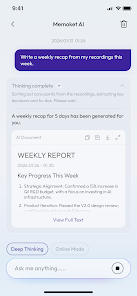
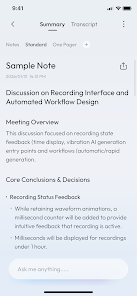
The app records ideas and conversations directly from a wearable device and streams or stores that audio to the companion app for processing. It uses automated summarization and intelligent parsing to surface action items and convert spoken action items into task entries with suggested due dates or reminders. Cross-conversation linking finds related notes and highlights recurring themes so your ideas do not live in isolation. There are also in-app writing tools that refine raw transcripts into concise summaries or cleaner drafts suitable for email, reports, or project notes.
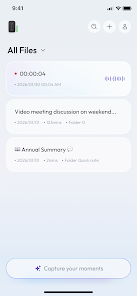
Memoket collects audio with minimal intervention: start a capture from the wearable or let voice activation do the work for you, then review the transcript on your phone or tablet. The companion app organizes new captures into an inbox that the processing engine reviews to extract tasks, tag topics, and produce brief summaries. You can edit, merge, or split entries and convert them into calendar events or task lists. The system is designed so the wearable focuses on lightweight capture while the companion app handles review and refinement.
The wearable control surface favors simple gestures and a tactile button for one-touch recording, plus optional voice activation for hands-free use. On the companion app, the interface relies on clear playback controls, inline transcript editing, and swipe gestures for quick triage. Search and filters let you find notes by keyword, date, or detected action item. Playback includes adjustable speed and timestamped highlights so you can jump to the moment the idea was spoken and edit the text or mark follow-ups directly from the timeline.
Memoket encourages a two-stage progression: capture and process. Captured audio flows into an inbox where automated parsing extracts tasks and topics, then you move items through review, edit, and scheduling steps. Tagging, folders, and smart linking create a lightweight progression system so items graduate from raw memory into scheduled tasks, reference notes, or polished drafts. This staged approach helps maintain momentum on ideas without losing context or piling up forgotten recordings.
The visual design is intentionally minimal, with a focus on legibility, large tap targets, and a neutral color palette that reduces distraction during review. Customization options include adjustable font sizes, compact or expanded transcript views, and theme choices for day or low-light use. You can also configure how aggressively the app extracts action items and which tags are suggested, tailoring the balance between automated suggestions and manual oversight to your workflow.
Accessibility features include high-contrast text options, keyboard and screen reader compatibility on supported devices, and adjustable playback speeds for transcripts. The wearable captures audio locally so you do not need constant connectivity to record thoughts; when a connection is available, the companion app will process and sync items. Note that some advanced processing, like cloud-based summarization, may perform faster with a network connection, while basic capture and local playback remain functional offline.
Environmental noise and overlapping speakers can affect transcription accuracy, so taking brief pauses before and after an idea helps clarity. Regularly triaging the inbox reduces backlog and improves the app's ability to link related notes. The app provides suggestions for refining vague entries into actionable tasks and recommends confirming scheduling details before converting items into calendar events. Privacy controls allow you to manage permissions for microphone access and data synchronization.
Beyond one-off captures, Memoket builds a personal knowledge base: recurring themes, meeting follow-ups, and refined drafts become searchable assets you can revisit and repurpose. Because voice captures are linked to summaries, tasks, and edited notes, the system encourages reuse and iterative improvement rather than a single-use recording. That makes the app useful not only for immediate productivity but for long-term project memory and continuous workflow improvement.