




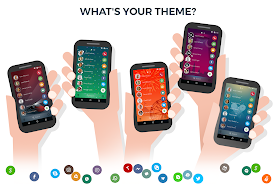


drupe is a smart contacts and communication hub for Android that brings calls, messages and apps into one convenient place. It places a quick-launch handle on your screen so you can drag contacts to perform actions like calling, messaging, or opening chat apps, speeding up everyday communication.
drupe centralizes your favorite people and communication tools into a single launcher. Instead of switching between dialer, SMS, and third-party chat apps, you tap the floating handle, pick a contact, and drag to the relevant action. The app supports voice calls, video calls, SMS, email and popular messengers so you keep all conversations accessible from one spot.
Unified contact list: drupe aggregates contacts from multiple accounts — phone, SIM, Google and third-party services — and displays them in a streamlined list with avatars and presence indicators. Action-based drag-and-drop: Actions appear as icons around the handle; dragging a contact to an icon performs the chosen task. Smart history: Recent calls, messages and app interactions are organized so you can resume conversations quickly without searching through separate apps.
The interface emphasizes speed and minimal friction. The floating handle can be positioned along the screen edge, expanded to show frequently used contacts, and hidden when not needed. A swipe-based navigation and a clear grid for actions make it possible to launch tasks with one fluid gesture. Messages and calls open in-app or delegate to your preferred service, depending on your settings.
drupe allows deep personalization. Choose themes, icon packs and handle styles to match your device aesthetic. Assign specific actions to contacts — for example, set a certain contact to always open a designated chat app or start a video call. The app integrates with many third-party services, letting you call with the native dialer, WhatsApp, Viber, Skype and more, so you retain the apps you already use.
Beyond basic messaging, drupe offers tools aimed at reducing repetitive tasks. Quick tasks like message templates, call notes, and scheduled reminders let you add context to conversations and follow-ups. The built-in caller ID and spam blocking features help manage unwanted calls, while integrated call recording (where permitted) can capture important exchanges for future reference.
Designed for Android, drupe is optimized to run smoothly on a wide range of devices. The floating handle consumes minimal system resources and can be set to auto-hide to avoid clutter. Compatibility extends across Android versions and popular launchers; battery and permission settings are presented clearly so users can control background activity and data access.
Privacy controls let you decide which accounts drupe can access and which permissions are granted. Contact and call history is stored locally with options to export or back up data. When using integrations like call recording or message backups, the app requests explicit permission and explains how the data is handled to ensure transparent operation.
Installation and setup are straightforward: grant the necessary permissions, pick the accounts and apps you want to include, and position the handle where it’s most convenient. The initial guided tour highlights core gestures and action slots so new users can start performing tasks within minutes. Frequent-use contacts can be pinned to the handle for instant access.
Any Android user who juggles multiple communication channels will find value in drupe’s streamlined approach. Professionals who make frequent calls, people who manage large social groups, and anyone who values speed and organization will appreciate reducing app-switching and simplifying daily communication flows.
With a focus on efficiency and customization, drupe reshapes how contacts and communication tools are presented on your device. It replaces scattered apps with a single, gesture-driven workflow that saves time and keeps conversations within easy reach. Try adjusting the handle placement and action set-up to tailor the experience to your daily routines.