




Daybook is a private daily journal app designed to capture thoughts, tasks, and moments with a clean, distraction-free interface. It merges quick entry options, multimedia attachments, and automatic reminders so users can maintain a consistent journaling routine across devices while keeping entries secure and searchable.
Daybook provides a set of core tools tailored for everyday journaling: text entries, voice notes, photos, and tags. Entries can be dated automatically or backfilled for past events. You can attach locations, mood indicators, and custom labels to make retrieval simpler. Built-in reminders encourage regular writing, and an entry timeline makes it easy to browse recent activity.
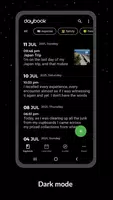
The app is organized around a simple feed and calendar view. The feed surfaces the latest items with previews, while the calendar view highlights days with entries for quick access. A floating action button or a top bar shortcut speeds up new entries. Menus are deliberately minimal so users spend less time setting options and more time recording their day.
Daybook supports multiple content formats to capture richer memories. Photos and video clips can be embedded inside an entry, and voice recordings are stored alongside text for hands-free logging. The editor includes basic formatting like bold and italics, plus options to insert checklists for short task lists. These mixed-media entries feel natural on phones and tablets.
Robust organizational tools make Daybook useful for both casual notes and detailed logs. Add tags to group entries by topic, project, or mood. Filter by tags, date range, or attachment type. A full-text search scans titles and body text so you can quickly find a forgotten thought. Saved queries and smart filters speed up repeat searches without rebuilding criteria.
Security is central to the design. Daybook supports pin codes, biometric locks, and optional encryption to protect sensitive entries. Local backups allow you to export data to a device, while cloud backup and restore keep your journal available across devices. The app also offers manual export to common file formats if you prefer long-term archiving outside the system.
Cross-device syncing keeps journals consistent on phones and tablets. Sync works in the background and resolves conflicts by timestamp or manual choice. Offline mode ensures you can create and edit entries without an internet connection; changes are queued and uploaded when connectivity resumes. This makes Daybook reliable for travelers and people with spotty coverage.
Personalization features let you tune the look and behaviour to match your habits. Choose a theme, adjust font sizes, and set the layout density for more compact or more spacious views. Templates speed up recurring entries—perfect for daily reflections, habit tracking, or gratitude lists. You can store templates for morning routines, meeting notes, or project check-ins.
The app connects with system-level features like sharing intents and voice assistants to streamline capture. Share text or images from other apps directly into a new entry. Integration with calendar apps and reminders allows Daybook to pull context from events and set follow-up prompts. These integrations reduce friction and keep journaling part of an everyday routine.
Designed to run smoothly on a wide range of Android devices, Daybook balances feature richness with responsiveness. The database is optimized to handle thousands of entries without lag, and media is stored efficiently to limit storage consumption. Regular updates address compatibility with the latest Android releases and popular device models.
Daybook blends a focused writing experience with practical tools for organization and security, making it a solid choice for anyone who wants to preserve daily moments or manage ongoing notes in one private, searchable place.