

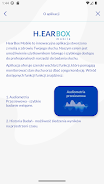




HearBox Mobile is a compact hearing screening tool you can run on a smartphone without headphones or extra equipment, designed to help users and caregivers spot potential hearing changes quickly. HearBox Mobile guides you through short, self-administered checks in a quiet environment and stores each session so you can review results and trends over time. The interface is intentionally simple so tests can be completed in a few minutes by adults, children or clinic staff with minimal training.
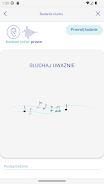
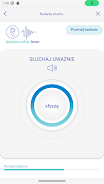
The screening mechanics in HearBox Mobile are based on brief tone and speech-in-noise checks that progress through a series of frequencies and intensity steps. Each session walks the user through consecutive test items that evaluate detection and response consistency; users respond using clear on-screen controls or large tappable buttons so the interaction is reliable on phones of different sizes. Tests are structured into short stages that cover low, mid and high frequencies, and the app adapts presentation speed to the user’s pace so the experience remains comfortable and repeatable. Because HearBox Mobile measures relative detection rather than delivering formal audiometry, it flags possible changes and produces an easy-to-read summary rather than a diagnostic report.
HearBox Mobile keeps controls straightforward: start, pause and repeat functions are presented prominently, and response actions are one-touch to reduce confusion during a test. The app displays clear progress indicators and contextual prompts before each stage, so users understand what to expect and how to respond. Visual indicators accompany auditory items for users who benefit from multimodal cues, and touch targets are sized for accessible use by older adults or caregivers conducting tests for children. Settings let you adjust test speed, volume calibration guidance, and silence reminders to help maintain testing conditions that improve reliability.
Progression in HearBox Mobile focuses on repeatable measurements and longitudinal tracking rather than levels or scoring in the gaming sense. You can create multiple profiles to separate family members or clinic patients, and each profile preserves date-stamped test results and contextual notes. Over time, the app shows simple trend visuals and side-by-side comparisons so you can spot gradual declines or sudden shifts in screening outcomes. Repeating tests at recommended intervals increases the value of stored history and supports early detection and timely professional referral when needed.
The app uses a clean, high-contrast visual style with large typography and uncluttered dialogs to make navigation intuitive for a wide age range. Color choices prioritize readability and the layout scales to different screen sizes for consistent presentation on phones and tablets. Accessibility features include adjustable font size, clear labels for screen readers, and simplified test modes for children or users with cognitive or motor challenges. These design choices aim to make HearBox Mobile usable by individuals with limited tech experience while maintaining clinical-minded clarity for health professionals who may use it for preliminary screening.
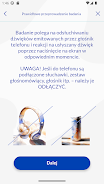
HearBox Mobile is designed to work offline so tests can be performed without an internet connection, which helps when screening in remote locations or clinical settings with limited connectivity. Test data is stored locally on the device and can be exported as needed for record-keeping or to share with a healthcare provider. It is important to maintain a quiet testing environment and follow on-screen setup guidance to improve result reliability; ambient noise and incorrect phone placement can affect outcomes.
HearBox Mobile provides indicative screening results and should not be used as a substitute for clinical audiometry or a comprehensive medical evaluation. If the app flags a potential hearing change, users are advised to consult a licensed audiologist or ENT specialist for diagnostic testing and professional interpretation. The app’s intent is prevention and monitoring: to help identify when a professional assessment is warranted rather than to deliver definitive diagnoses.
HearBox Mobile is suitable for individuals who want a convenient way to monitor hearing at home, families who want to maintain test records for multiple members, and healthcare workers or community screeners needing a fast, portable tool for preliminary checks. The combination of simple controls, profile management, offline capability and trend tracking makes it a practical complement to routine care and a useful early-warning tool that supports timely professional follow-up when necessary.