

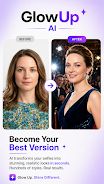

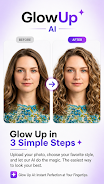


GlowUp AI is a smart photo-editing app that enhances portraits and selfies using AI-driven retouching, background editing, and style filters. It combines intuitive controls with fast processing so users can polish images for social media, professional profiles, or creative projects without steep learning curves.
Designed for mobile creators and casual users alike, GlowUp AI focuses on delivering clean edits with minimal effort. The app balances automated fixes and manual tools, letting you rely on one-tap improvements or drill down into precise adjustments. Expect features aimed at skin enhancement, lighting correction, and artistic transformations.
Unlike traditional editors that require layered workflows, GlowUp AI streamlines common portrait tasks into a few clear steps. Its machine learning models detect facial features, separate subjects from backgrounds, and suggest context-aware filters. The result is consistent output that speeds up batch work while preserving natural details.
Load a photo, then choose between Auto Enhance or the Edit workspace. Auto Enhance analyzes facial landmarks and global lighting to propose a single-tap improvement. In Edit mode you can use tools like Dodge & Burn, background replacement, and hair color simulation. Real-time previews let you compare the original and edited versions quickly.
The interface prioritizes clarity: tools are grouped by purpose and represented with concise icons. GlowUp AI runs smoothly on mid-range devices, thanks to optimized on-device models. Heavy operations such as background replacement may take a few seconds, but asynchronous processing allows you to queue multiple edits without interrupting the workflow.
For users who want a distinct visual identity, GlowUp AI offers customizable presets and the ability to save personal templates. You can tweak filter parameters and export them for future sessions. Color curves and HSL controls provide deeper color grading for advanced users.
Many users appreciate the balance between automation and control. Beginners benefit from the one-tap fixes, while experienced editors can fine-tune results. The app also supports direct sharing to social platforms and exports at high resolution, which is useful for creators who maintain consistent visual standards.
Installing GlowUp AI is straightforward from the app store. Initial setup guides you through permission requests for storage and camera access. There is a free tier with essential features and an optional subscription unlocking advanced filters, higher-resolution exports, and priority processing.
GlowUp AI delivers a focused set of tools for portrait enhancement that will appeal to social creators and professionals needing quick, reliable results. Its thoughtful interface and effective AI make complex edits approachable, while the export options and presets support consistent creative workflows.