



Most photo apps bury essential features under layers of menus. LINE Camera takes a different approach by giving you a single place to shoot, edit and decorate photos without hunting for tools. It blends a capable camera interface with a wide set of editing utilities so you can polish portraits, assemble collages or add playful stickers in a few taps. The app caters to casual users who want quick results and to hobbyists who enjoy experimenting: live filters, beauty adjustments and a massive stamp library sit alongside standard camera controls.
Selfies & Portraits: Built-in beauty settings and live filters help you tweak skin tone, brighten eyes and soften backgrounds before you save a shot.
Creative Collages: Combine multiple frames into themed layouts for events, travel albums or daily snapshots.
Decor & Social-ready: Add text, brushes and stamps to create shareable images for stories and posts.
Camera tools: A complete camera screen includes timer, flash, mirror mode, level and grid so you can frame steady, well-composed pictures.
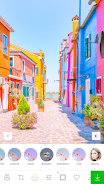
Live filters & beauty: Preview effects in real time and apply subtle enhancements for a cleaner look without heavy editing.
Extensive stamp library: Browse thousands of decorative stamps to personalize photos; the variety covers seasonal themes, icons and hand-drawn accents.
Text and brushes: Add captions, slogans or doodles with selectable fonts and brush sizes to communicate mood or create mock posters.
Collage maker: Arrange multiple images into one layout, adjust borders and spacing, then export a single image for sharing.
Use the grid and level: Align horizons and faces by enabling the grid and level markers to avoid crooked shots.
Quick edits on the go: While waiting for a coffee or during a short break, snap a portrait and apply a live filter for instant social-ready images.
Capture notes and whiteboards: Photograph a whiteboard or receipt, then crop and annotate with text or brushes to turn the photo into a useful reference.
Is LINE Camera free to download?
Core editing and camera features are typically available free; the app listing on Google Play or the developer page will show current pricing and any in-app purchases.
Can I save edits in high resolution?
Export quality can depend on your device and app version. Look for quality or export settings inside the app if you need larger files for prints.
Do I need an internet connection to use LINE Camera?
Basic shooting and offline editing work without a connection, but downloading new stamps, templates or language packs requires internet access.
LINE Camera balances playful decoration options with genuine camera and editing tools, making it a handy choice if you enjoy customizing photos before sharing. Give it a try to explore the stamp collection and real-time filters, and check the app page for the latest add-ons and compatibility notes.